In the Weave UI, you can export your data in multiple formats. It also shows the Python and cURL code that you can use to export the rows programatically. To export Calls:
  1. Navigate to wandb.ai and select your project.
  2. In the Weave project sidebar, click Traces.
  3. Select multiple Calls that you want to export by checking the row.
  4. In the Traces table toolbar, click the export/download button.
  5. In the Export modal, choose Selected rows or All rows. Click Export.
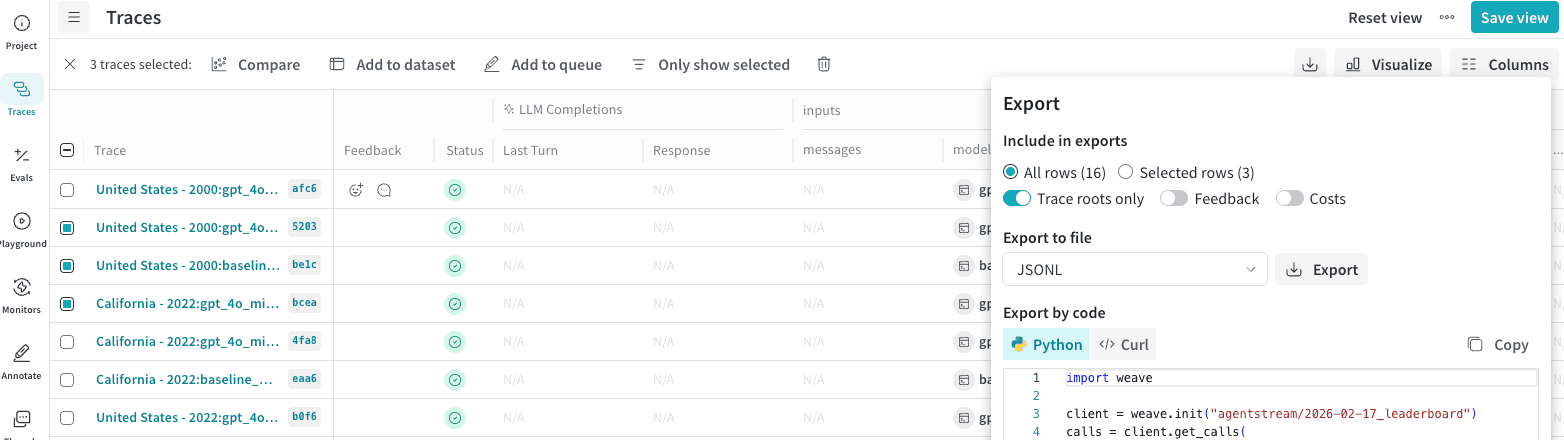
Traces page showing selected Calls ready for export in the Export modal.

Fetch calls programmatically

To fetch calls using the Python API, you can use the client.get_calls method:
import weave

# Initialize the client
client = weave.init("your-project-name")

# Fetch calls
calls = client.get_calls(filter=...)
For complete details on call properties and fields, see the Call schema reference.

Export call metrics

You can also use the Weave Service API’s POST /calls/stats endpoint to retrieve metrics about your Calls without retrieving the Call data itself. This allows you to quickly and efficiently retrieve information about your Calls, such as latency and cost, and aggregate them by sum, average, minimum, maximum, and count. For example, you can retrieve:
  • Total token usage
  • Average latency
  • Maximum tokens used
  • Total cost
  • Minimum input tokens
The endpoint provides several filtering options that allow you to target Calls made within specified time periods, and by other properties, such as:
  • Op name
  • Trace ID
  • Thread ID
  • User ID
The following example demonstrates how to retrieve Calls generated from an Op named web_app over a two-day period:
import requests
import json
import os

url = "https://trace.wandb.ai/calls/stats"

payload = {
    "project_id": "<your-team-name/your-project-name>",
    "start": "2026-03-01T00:00:00Z",
# Specify the size of the buckets, in seconds.
    "granularity": 86400,
    "filter": {
        "trace_roots_only": True,
        "op_names": ["web_app"]
    },
# Specify metrics and their aggregate function
    "usage_metrics": [
        {"metric": "total_tokens", "aggregations": ["sum"]},
        {"metric": "total_cost", "aggregations": ["sum"]}
    ],
    "call_metrics": [
        {"metric": "call_count", "aggregations": ["sum"]},
        {"metric": "error_count", "aggregations": ["sum"]},
        {"metric": "latency_ms", "aggregations": ["avg", "min", "max"], "percentiles": [50, 95, 99]}
    ]
}

API_KEY = os.getenv("WANDB_API_KEY")

response = requests.post(url, json=payload, auth=("api", API_KEY))

print(json.dumps(response.json(), indent=2))
The request also specifies how to aggregate the metrics. You can aggregate metrics by sum, count, avg, min, max, and count. The endpoint returns a JSON object. The following example response shows two days’ worth of metrics. Each day (bucket) is broken up into its own object in the usage_buckets and call_buckets arrays. Each array breaks down the metrics differently:
  • usage_buckets: Groups Call metrics for each day by the model used.
  • call_buckets: Groups Call metrics for each day regardless of the model used.
Set the granularity field (in seconds) in the request to change the bucket size.
{
  "start": "2026-03-03T00:00:00Z",
  "end": "2026-03-04T21:34:39.746539Z",
  "granularity": 86400,
  "timezone": "UTC",
  "usage_buckets": [
    {
      "timestamp": "2026-03-03T00:00:00",
      "model": "gpt-4o-2024-08-06",
      "sum_total_tokens": 498.0,
      "sum_input_tokens": 219.0,
      "sum_output_tokens": 279.0,
      "count": 5,
      "sum_total_cost": 0.0033374999156876584
    },
    {
      "timestamp": "2026-03-03T00:00:00",
      "model": "gpt-5-2025-08-07",
      "sum_total_tokens": 0.0,
      "sum_input_tokens": 0.0,
      "sum_output_tokens": 0.0,
      "count": 0,
      "sum_total_cost": 0.0
    },
    {
      "timestamp": "2026-03-04T00:00:00",
      "model": "gpt-4o-2024-08-06",
      "sum_total_tokens": 58.0,
      "sum_input_tokens": 27.0,
      "sum_output_tokens": 31.0,
      "count": 1,
      "sum_total_cost": 0.0003774999904635479
    },
    {
      "timestamp": "2026-03-04T00:00:00",
      "model": "gpt-5-2025-08-07",
      "sum_total_tokens": 427.0,
      "sum_input_tokens": 26.0,
      "sum_output_tokens": 401.0,
      "count": 1,
      "sum_total_cost": 0.00404249989787786
    }
  ],
  "call_buckets": [
    {
      "timestamp": "2026-03-03T00:00:00",
      "sum_call_count": 6,
      "sum_error_count": 1,
      "avg_latency_ms": 1505.6666666666667,
      "min_latency_ms": 525,
      "max_latency_ms": 2524,
      "p50_latency_ms": 1534.0,
      "p95_latency_ms": 2328.5,
      "p99_latency_ms": 2484.9000000000005,
      "count": 6
    },
    {
      "timestamp": "2026-03-04T00:00:00",
      "sum_call_count": 2,
      "sum_error_count": 0,
      "avg_latency_ms": 3645.0,
      "min_latency_ms": 1739,
      "max_latency_ms": 5551,
      "p50_latency_ms": 3645.0,
      "p95_latency_ms": 5360.4,
      "p99_latency_ms": 5512.88,
      "count": 2
    }
  ]
}
You can query metrics for a maximum time range of 31 days. See the Service API reference for more details and available options.