> ## Documentation Index
> Fetch the complete documentation index at: https://wb-21fd5541-docs-1917.mintlify.site/llms.txt
> Use this file to discover all available pages before exploring further.
> Discover how to automate hyperparamter sweeps on launch.
# Create sweeps with W&B Launch
Create a hyperparameter tuning job ([sweeps](/models/sweeps/)) with W\&B Launch. With sweeps on launch, a sweep scheduler is pushed to a Launch Queue with the specified hyperparameters to sweep over. The sweep scheduler starts as it is picked up by the agent, launching sweep runs onto the same queue with chosen hyperparameters. This continues until the sweep finishes or is stopped.
You can use the default W\&B Sweep scheduling engine or implement your own custom scheduler:
1. Standard sweep scheduler: Use the default W\&B Sweep scheduling engine that controls [W\&B Sweeps](/models/sweeps/). The familiar `bayes`, `grid`, and `random` methods are available.
2. Custom sweep scheduler: Configure the sweep scheduler to run as a job. This option enables full customization. An example of how to extend the standard sweep scheduler to include more logging can be found in the section below.
This guide assumes that W\&B Launch has been previously configured. If W\&B Launch has is not configured, see the [how to get started](./#how-to-get-started) section of the launch documentation.
We recommend you create a sweep on launch using the 'basic' method if you are a first time users of sweeps on launch. Use a custom sweeps on launch scheduler when the standard W\&B scheduling engine does not meet your needs.
## Create a sweep with a W\&B standard scheduler
Create W\&B Sweeps with Launch. You can create a sweep interactively with the W\&B App or programmatically with the W\&B CLI. For advanced configurations of Launch sweeps, including the ability to customize the scheduler, use the CLI.
Before you create a sweep with W\&B Launch, ensure that you first create a job to sweep over. See the [Create a Job](/platform/launch/create-launch-job/) page for more information.
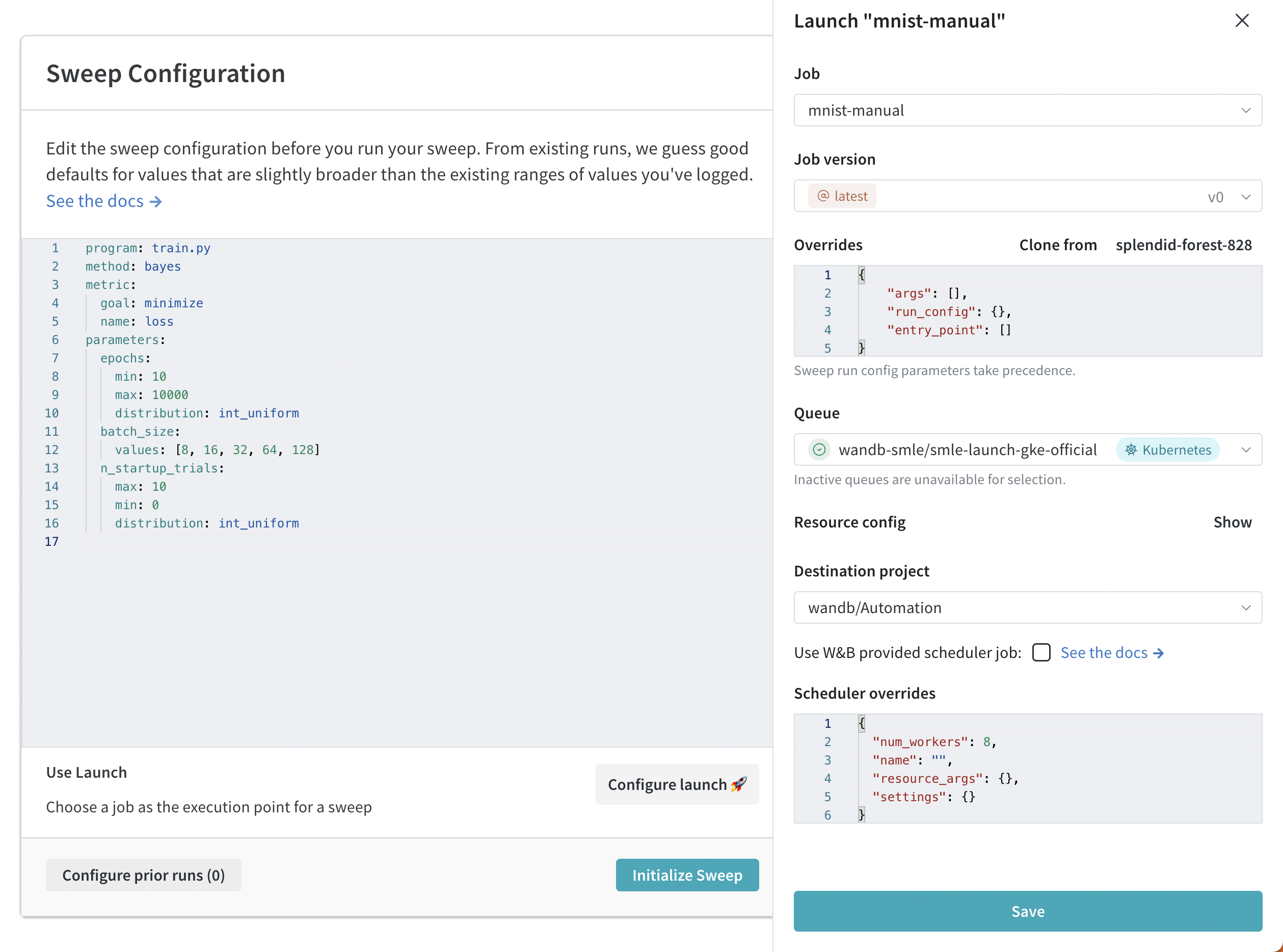
Create a sweep interactively with the W\&B App.
1. Navigate to your W\&B project on the W\&B App.
2. Select the sweeps icon in the project sidebar (broom image).
3. Next, select the **Create Sweep** button.
4. Click the **Configure Launch** button.
5. From the **Job** dropdown menu, select the name of your job and the job version you want to create a sweep from.
6. Select a queue to run the sweep on using the **Queue** dropdown menu.
7. Use the **Job Priority** dropdown to specify the priority of your launch job. A launch job's priority is set to "Medium" if the launch queue does not support prioritization.
8. (Optional) Configure override args for the run or sweep scheduler. For example, using the scheduler overrides, configure the number of concurrent runs the scheduler manages using `num_workers`.
9. (Optional) Select a project to save the sweep to using the **Destination Project** dropdown menu.
10. Click **Save**
11. Select **Launch Sweep**.
 Programmatically create a W\&B Sweep with Launch with the W\&B CLI.
1. Create a Sweep configuration
2. Specify the full job name within your sweep configuration
3. Initialize a sweep agent.
Steps 1 and 3 are the same steps you normally take when you create a W\&B Sweep.
For example, in the following code snippet, we specify `'wandb/jobs/Hello World 2:latest'` for the job value:
```yaml theme={null}
# launch-sweep-config.yaml
job: 'wandb/jobs/Hello World 2:latest'
description: sweep examples using launch jobs
method: bayes
metric:
goal: minimize
name: loss_metric
parameters:
learning_rate:
max: 0.02
min: 0
distribution: uniform
epochs:
max: 20
min: 0
distribution: int_uniform
# Optional scheduler parameters:
# scheduler:
# num_workers: 1 # concurrent sweep runs
# docker_image:
# resource:
# resource_args: # resource arguments passed to runs
# env:
# - WANDB_API_KEY
# Optional Launch Params
# launch:
# registry:
```
For information on how to create a sweep configuration, see the [Define sweep configuration](/platform/launch/sweeps-on-launch/) page.
4. Next, initialize a sweep. Provide the path to your config file, the name of your job queue, your W\&B entity, and the name of the project.
```bash theme={null}
wandb launch-sweep --queue --entity --project
```
For more information on W\&B Sweeps, see the [Tune Hyperparameters](/models/sweeps/) chapter.
## Create a custom sweep scheduler
Create a custom sweep scheduler either with the W\&B scheduler or a custom scheduler.
Using scheduler jobs requires wandb cli version >= `0.15.4`
Create a launch sweep using the W\&B sweep scheduling logic as a job.
1. Identify the Wandb scheduler job in the public wandb/sweep-jobs project, or use the job name:
`'wandb/sweep-jobs/job-wandb-sweep-scheduler:latest'`
2. Construct a configuration yaml with an additional `scheduler` block that includes a `job` key pointing to this name, example below.
3. Use the `wandb launch-sweep` command with the new config.
Example config:
```yaml theme={null}
# launch-sweep-config.yaml
description: Launch sweep config using a scheduler job
scheduler:
job: wandb/sweep-jobs/job-wandb-sweep-scheduler:latest
num_workers: 8 # allows 8 concurrent sweep runs
# training/tuning job that the sweep runs will execute
job: wandb/sweep-jobs/job-fashion-MNIST-train:latest
method: grid
parameters:
learning_rate:
min: 0.0001
max: 0.1
```
Custom schedulers can be created by creating a scheduler-job. For the purposes of this guide we will be modifying the `WandbScheduler` to provide more logging.
1. Clone the `wandb/launch-jobs` repo (specifically: `wandb/launch-jobs/jobs/sweep_schedulers`)
2. Now, we can modify the `wandb_scheduler.py` to achieve our desired increased logging. Example: Add logging to the function `_poll`. This is called once every polling cycle (configurable timing), before we launch new sweep runs.
3. Run the modified file to create a job, with: `python wandb_scheduler.py --project --entity --name CustomWandbScheduler`
4. Identify the name of the job created, either in the UI or in the output of the previous call, which will be a code-artifact job (unless otherwise specified).
5. Now create a sweep configuration where the scheduler points to your new job.
```yaml theme={null}
...
scheduler:
job: '//job-CustomWandbScheduler:latest'
...
```
Optuna is a hyperparameter optimization framework that uses a variety of algorithms to find the best hyperparameters for a given model (similar to W\&B). In addition to the [sampling algorithms](https://optuna.readthedocs.io/en/stable/reference/samplers/index.html), Optuna also provides a variety of [pruning algorithms](https://optuna.readthedocs.io/en/stable/reference/pruners.html) that can be used to terminate poorly performing runs early. This is especially useful when running a large number of runs, as it can save time and resources. The classes are highly configurable, just pass in the expected parameters in the `scheduler.settings.pruner/sampler.args` block of the config file.
Create a launch sweep using Optuna's scheduling logic with a job.
1. First, create your own job or use a pre-built Optuna scheduler image job.
* See the [`wandb/launch-jobs`](https://github.com/wandb/launch-jobs/blob/main/jobs/sweep_schedulers) repo for examples on how to create your own job.
* To use a pre-built Optuna image, you can either navigate to `job-optuna-sweep-scheduler` in the `wandb/sweep-jobs` project or use can use the job name: `wandb/sweep-jobs/job-optuna-sweep-scheduler:latest`.
2. After you create a job, you can now create a sweep. Construct a sweep config that includes a `scheduler` block with a `job` key pointing to the Optuna scheduler job (example below).
```yaml theme={null}
# optuna_config_basic.yaml
description: A basic Optuna scheduler
job: wandb/sweep-jobs/job-fashion-MNIST-train:latest
run_cap: 5
metric:
name: epoch/val_loss
goal: minimize
scheduler:
job: wandb/sweep-jobs/job-optuna-sweep-scheduler:latest
resource: local-container # required for scheduler jobs sourced from images
num_workers: 2
# optuna specific settings
settings:
pruner:
type: PercentilePruner
args:
percentile: 25.0 # kill 75% of runs
n_warmup_steps: 10 # pruning turned off for first x steps
parameters:
learning_rate:
min: 0.0001
max: 0.1
```
3. Lastly, launch the sweep to an active queue with the launch-sweep command:
```bash theme={null}
wandb launch-sweep -q -p -e
```
For the exact implementation of the Optuna sweep scheduler job, see [wandb/launch-jobs](https://github.com/wandb/launch-jobs/blob/main/jobs/sweep_schedulers/optuna_scheduler/optuna_scheduler.py). For more examples of what is possible with the Optuna scheduler, check out [wandb/examples](https://github.com/wandb/examples/tree/master/examples/launch/launch-sweeps/optuna-scheduler).
Examples of what is possible with custom sweep scheduler jobs are available in the [wandb/launch-jobs](https://github.com/wandb/launch-jobs) repo under `jobs/sweep_schedulers`. This guide shows how to use the publicly available **Wandb Scheduler Job**, as well demonstrates a process for creating custom sweep scheduler jobs.
## How to resume sweeps on launch
It is also possible to resume a launch-sweep from a previously launched sweep. Although hyperparameters and the training job cannot be changed, scheduler-specific parameters can be, as well as the queue it is pushed to.
If the initial sweep used a training job with an alias like 'latest', resuming can lead to different results if the latest job version has been changed since the last run.
1. Identify the sweep name/ID for a previously run launch sweep. The sweep ID is an eight character string (for example, `hhd16935`) that you can find in your project on the W\&B App.
2. If you change the scheduler parameters, construct an updated config file.
3. In your terminal, execute the following command. Replace content wrapped in `<` and `>` with your information:
```bash theme={null}
wandb launch-sweep --resume_id --queue
```
Programmatically create a W\&B Sweep with Launch with the W\&B CLI.
1. Create a Sweep configuration
2. Specify the full job name within your sweep configuration
3. Initialize a sweep agent.
Steps 1 and 3 are the same steps you normally take when you create a W\&B Sweep.
For example, in the following code snippet, we specify `'wandb/jobs/Hello World 2:latest'` for the job value:
```yaml theme={null}
# launch-sweep-config.yaml
job: 'wandb/jobs/Hello World 2:latest'
description: sweep examples using launch jobs
method: bayes
metric:
goal: minimize
name: loss_metric
parameters:
learning_rate:
max: 0.02
min: 0
distribution: uniform
epochs:
max: 20
min: 0
distribution: int_uniform
# Optional scheduler parameters:
# scheduler:
# num_workers: 1 # concurrent sweep runs
# docker_image:
# resource:
# resource_args: # resource arguments passed to runs
# env:
# - WANDB_API_KEY
# Optional Launch Params
# launch:
# registry:
```
For information on how to create a sweep configuration, see the [Define sweep configuration](/platform/launch/sweeps-on-launch/) page.
4. Next, initialize a sweep. Provide the path to your config file, the name of your job queue, your W\&B entity, and the name of the project.
```bash theme={null}
wandb launch-sweep --queue --entity --project
```
For more information on W\&B Sweeps, see the [Tune Hyperparameters](/models/sweeps/) chapter.
## Create a custom sweep scheduler
Create a custom sweep scheduler either with the W\&B scheduler or a custom scheduler.
Using scheduler jobs requires wandb cli version >= `0.15.4`
Create a launch sweep using the W\&B sweep scheduling logic as a job.
1. Identify the Wandb scheduler job in the public wandb/sweep-jobs project, or use the job name:
`'wandb/sweep-jobs/job-wandb-sweep-scheduler:latest'`
2. Construct a configuration yaml with an additional `scheduler` block that includes a `job` key pointing to this name, example below.
3. Use the `wandb launch-sweep` command with the new config.
Example config:
```yaml theme={null}
# launch-sweep-config.yaml
description: Launch sweep config using a scheduler job
scheduler:
job: wandb/sweep-jobs/job-wandb-sweep-scheduler:latest
num_workers: 8 # allows 8 concurrent sweep runs
# training/tuning job that the sweep runs will execute
job: wandb/sweep-jobs/job-fashion-MNIST-train:latest
method: grid
parameters:
learning_rate:
min: 0.0001
max: 0.1
```
Custom schedulers can be created by creating a scheduler-job. For the purposes of this guide we will be modifying the `WandbScheduler` to provide more logging.
1. Clone the `wandb/launch-jobs` repo (specifically: `wandb/launch-jobs/jobs/sweep_schedulers`)
2. Now, we can modify the `wandb_scheduler.py` to achieve our desired increased logging. Example: Add logging to the function `_poll`. This is called once every polling cycle (configurable timing), before we launch new sweep runs.
3. Run the modified file to create a job, with: `python wandb_scheduler.py --project --entity --name CustomWandbScheduler`
4. Identify the name of the job created, either in the UI or in the output of the previous call, which will be a code-artifact job (unless otherwise specified).
5. Now create a sweep configuration where the scheduler points to your new job.
```yaml theme={null}
...
scheduler:
job: '//job-CustomWandbScheduler:latest'
...
```
Optuna is a hyperparameter optimization framework that uses a variety of algorithms to find the best hyperparameters for a given model (similar to W\&B). In addition to the [sampling algorithms](https://optuna.readthedocs.io/en/stable/reference/samplers/index.html), Optuna also provides a variety of [pruning algorithms](https://optuna.readthedocs.io/en/stable/reference/pruners.html) that can be used to terminate poorly performing runs early. This is especially useful when running a large number of runs, as it can save time and resources. The classes are highly configurable, just pass in the expected parameters in the `scheduler.settings.pruner/sampler.args` block of the config file.
Create a launch sweep using Optuna's scheduling logic with a job.
1. First, create your own job or use a pre-built Optuna scheduler image job.
* See the [`wandb/launch-jobs`](https://github.com/wandb/launch-jobs/blob/main/jobs/sweep_schedulers) repo for examples on how to create your own job.
* To use a pre-built Optuna image, you can either navigate to `job-optuna-sweep-scheduler` in the `wandb/sweep-jobs` project or use can use the job name: `wandb/sweep-jobs/job-optuna-sweep-scheduler:latest`.
2. After you create a job, you can now create a sweep. Construct a sweep config that includes a `scheduler` block with a `job` key pointing to the Optuna scheduler job (example below).
```yaml theme={null}
# optuna_config_basic.yaml
description: A basic Optuna scheduler
job: wandb/sweep-jobs/job-fashion-MNIST-train:latest
run_cap: 5
metric:
name: epoch/val_loss
goal: minimize
scheduler:
job: wandb/sweep-jobs/job-optuna-sweep-scheduler:latest
resource: local-container # required for scheduler jobs sourced from images
num_workers: 2
# optuna specific settings
settings:
pruner:
type: PercentilePruner
args:
percentile: 25.0 # kill 75% of runs
n_warmup_steps: 10 # pruning turned off for first x steps
parameters:
learning_rate:
min: 0.0001
max: 0.1
```
3. Lastly, launch the sweep to an active queue with the launch-sweep command:
```bash theme={null}
wandb launch-sweep -q -p -e
```
For the exact implementation of the Optuna sweep scheduler job, see [wandb/launch-jobs](https://github.com/wandb/launch-jobs/blob/main/jobs/sweep_schedulers/optuna_scheduler/optuna_scheduler.py). For more examples of what is possible with the Optuna scheduler, check out [wandb/examples](https://github.com/wandb/examples/tree/master/examples/launch/launch-sweeps/optuna-scheduler).
Examples of what is possible with custom sweep scheduler jobs are available in the [wandb/launch-jobs](https://github.com/wandb/launch-jobs) repo under `jobs/sweep_schedulers`. This guide shows how to use the publicly available **Wandb Scheduler Job**, as well demonstrates a process for creating custom sweep scheduler jobs.
## How to resume sweeps on launch
It is also possible to resume a launch-sweep from a previously launched sweep. Although hyperparameters and the training job cannot be changed, scheduler-specific parameters can be, as well as the queue it is pushed to.
If the initial sweep used a training job with an alias like 'latest', resuming can lead to different results if the latest job version has been changed since the last run.
1. Identify the sweep name/ID for a previously run launch sweep. The sweep ID is an eight character string (for example, `hhd16935`) that you can find in your project on the W\&B App.
2. If you change the scheduler parameters, construct an updated config file.
3. In your terminal, execute the following command. Replace content wrapped in `<` and `>` with your information:
```bash theme={null}
wandb launch-sweep --resume_id --queue
```