> ## Documentation Index
> Fetch the complete documentation index at: https://wb-21fd5541-docs-1917.mintlify.site/llms.txt
> Use this file to discover all available pages before exploring further.
> Integrate W&B with the DeepChem library for experiment tracking and visualization of molecular ML models.
# DeepChem
The [DeepChem library](https://github.com/deepchem/deepchem) provides open source tools that democratize the use of deep-learning in drug discovery, materials science, chemistry, and biology. This W\&B integration adds simple and easy-to-use experiment tracking and model checkpointing while training models using DeepChem.
## DeepChem logging in 3 lines of code
```python theme={null}
logger = WandbLogger(…)
model = TorchModel(…, wandb_logger=logger)
model.fit(…)
```
 ## Report and Google Colab
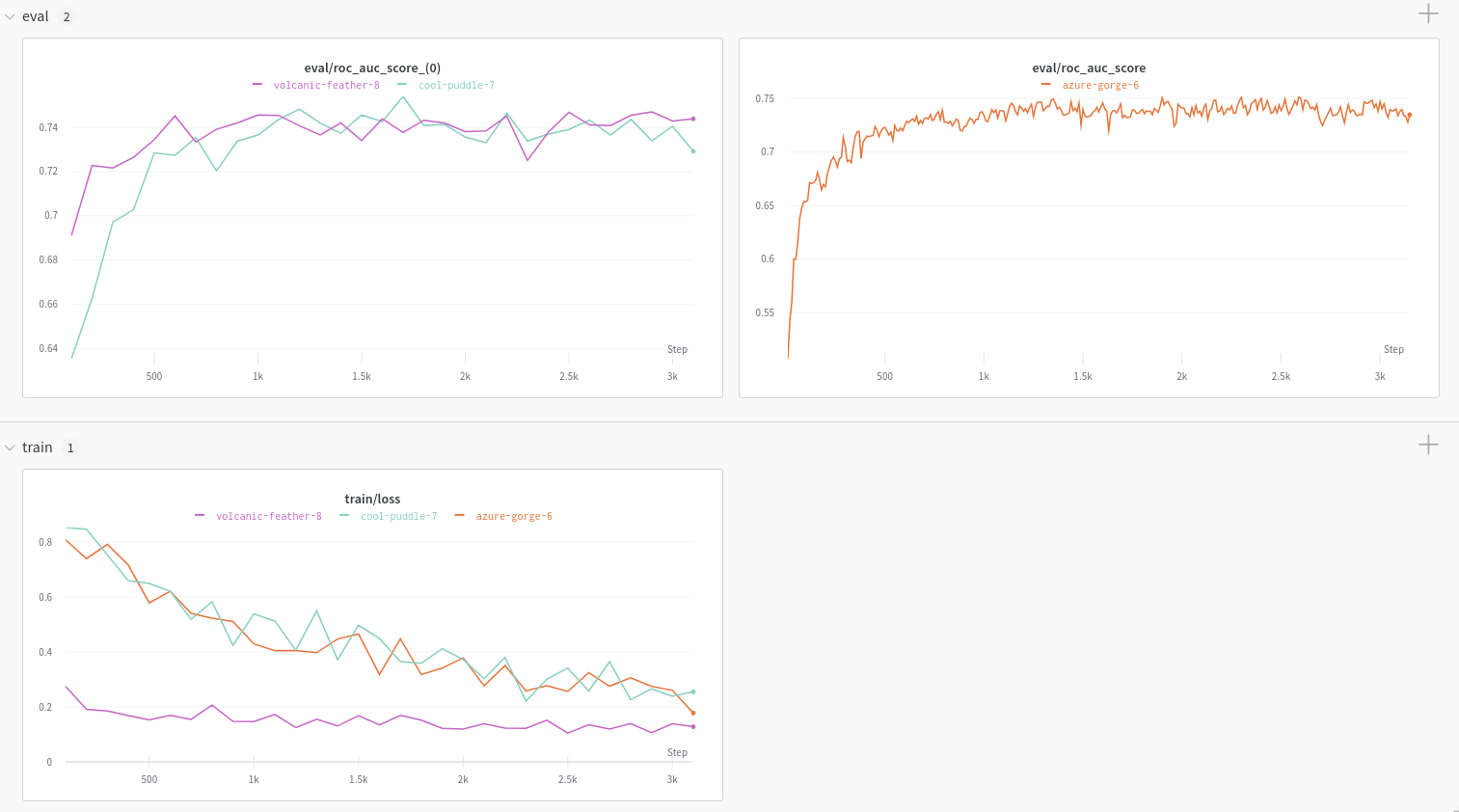
Explore the Using [W\&B with DeepChem: Molecular Graph Convolutional Networks](https://wandb.ai/kshen/deepchem_graphconv/reports/Using-W-B-with-DeepChem-Molecular-Graph-Convolutional-Networks--Vmlldzo4MzU5MDc?galleryTag=) article for an example charts generated using the W\&B DeepChem integration.
To dive straight into working code, check out this [Google Colab](https://colab.research.google.com/github/wandb/examples/blob/master/colabs/deepchem/W%26B_x_DeepChem.ipynb).
## Track experiments
Set up W\&B for DeepChem models of type [KerasModel](https://deepchem.readthedocs.io/en/latest/api_reference/models.html#keras-models) or [TorchModel](https://deepchem.readthedocs.io/en/latest/api_reference/models.html#pytorch-models).
### Sign up and create an API key
An API key authenticates your machine to W\&B. You can generate an API key from your user profile.
For a more streamlined approach, create an API key by going directly to [User Settings](https://wandb.ai/settings). Copy the newly created API key immediately and save it in a secure location such as a password manager.
1. Click your user profile icon in the upper right corner.
2. Select **User Settings**, then scroll to the **API Keys** section.
### Install the `wandb` library and log in
To install the `wandb` library locally and log in:
1. Set the `WANDB_API_KEY` [environment variable](/models/track/environment-variables/) to your API key.
```bash theme={null}
export WANDB_API_KEY=
```
2. Install the `wandb` library and log in.
```shell theme={null}
pip install wandb
wandb login
```
```bash theme={null}
pip install wandb
```
```python theme={null}
import wandb
wandb.login()
```
```notebook theme={null}
!pip install wandb
import wandb
wandb.login()
```
### Log your training and evaluation data to W\&B
Training loss and evaluation metrics can be automatically logged to W\&B. Optional evaluation can be enabled using the DeepChem [ValidationCallback](https://github.com/deepchem/deepchem/blob/master/deepchem/models/callbacks.py), the `WandbLogger` will detect ValidationCallback callback and log the metrics generated.
```python theme={null}
from deepchem.models import TorchModel, ValidationCallback
vc = ValidationCallback(…) # optional
model = TorchModel(…, wandb_logger=logger)
model.fit(…, callbacks=[vc])
logger.finish()
```
```python theme={null}
from deepchem.models import KerasModel, ValidationCallback
vc = ValidationCallback(…) # optional
model = KerasModel(…, wandb_logger=logger)
model.fit(…, callbacks=[vc])
logger.finish()
```
## Report and Google Colab
Explore the Using [W\&B with DeepChem: Molecular Graph Convolutional Networks](https://wandb.ai/kshen/deepchem_graphconv/reports/Using-W-B-with-DeepChem-Molecular-Graph-Convolutional-Networks--Vmlldzo4MzU5MDc?galleryTag=) article for an example charts generated using the W\&B DeepChem integration.
To dive straight into working code, check out this [Google Colab](https://colab.research.google.com/github/wandb/examples/blob/master/colabs/deepchem/W%26B_x_DeepChem.ipynb).
## Track experiments
Set up W\&B for DeepChem models of type [KerasModel](https://deepchem.readthedocs.io/en/latest/api_reference/models.html#keras-models) or [TorchModel](https://deepchem.readthedocs.io/en/latest/api_reference/models.html#pytorch-models).
### Sign up and create an API key
An API key authenticates your machine to W\&B. You can generate an API key from your user profile.
For a more streamlined approach, create an API key by going directly to [User Settings](https://wandb.ai/settings). Copy the newly created API key immediately and save it in a secure location such as a password manager.
1. Click your user profile icon in the upper right corner.
2. Select **User Settings**, then scroll to the **API Keys** section.
### Install the `wandb` library and log in
To install the `wandb` library locally and log in:
1. Set the `WANDB_API_KEY` [environment variable](/models/track/environment-variables/) to your API key.
```bash theme={null}
export WANDB_API_KEY=
```
2. Install the `wandb` library and log in.
```shell theme={null}
pip install wandb
wandb login
```
```bash theme={null}
pip install wandb
```
```python theme={null}
import wandb
wandb.login()
```
```notebook theme={null}
!pip install wandb
import wandb
wandb.login()
```
### Log your training and evaluation data to W\&B
Training loss and evaluation metrics can be automatically logged to W\&B. Optional evaluation can be enabled using the DeepChem [ValidationCallback](https://github.com/deepchem/deepchem/blob/master/deepchem/models/callbacks.py), the `WandbLogger` will detect ValidationCallback callback and log the metrics generated.
```python theme={null}
from deepchem.models import TorchModel, ValidationCallback
vc = ValidationCallback(…) # optional
model = TorchModel(…, wandb_logger=logger)
model.fit(…, callbacks=[vc])
logger.finish()
```
```python theme={null}
from deepchem.models import KerasModel, ValidationCallback
vc = ValidationCallback(…) # optional
model = KerasModel(…, wandb_logger=logger)
model.fit(…, callbacks=[vc])
logger.finish()
```