> ## Documentation Index
> Fetch the complete documentation index at: https://wb-21fd5541-docs-1917.mintlify.site/llms.txt
> Use this file to discover all available pages before exploring further.
# Instructor
> Weave의 Instructor 인테그레이션으로 LLM의 구조화된 데이터 추출을 트레이스하고, Pydantic 검증과 재시도 로직을 포착합니다.
 [Instructor](https://python.useinstructor.com/)는 LLM에서 JSON과 같은 구조화된 데이터를 쉽게 얻을 수 있게 해주는 경량 라이브러리입니다.
## 트레이싱
개발 중이든 프로덕션이든, 언어 모델 애플리케이션의 트레이스를 한곳에 중앙 집중식으로 저장하는 것이 중요합니다. 이러한 트레이스는 디버깅에 유용할 뿐 아니라, 애플리케이션 개선에 도움이 되는 데이터셋으로도 활용할 수 있습니다.
Weave는 [Instructor](https://python.useinstructor.com/)의 트레이스를 자동으로 캡처합니다. 추적을 시작하려면 `weave.init(project_name="")`를 호출한 다음, 평소처럼 라이브러리를 사용하세요.
```python lines theme={null}
import instructor
import weave
from pydantic import BaseModel
from openai import OpenAI
# 원하는 출력 구조 정의
class UserInfo(BaseModel):
user_name: str
age: int
# Weave 초기화
weave.init(project_name="instructor-test")
# OpenAI 클라이언트 패치
client = instructor.from_openai(OpenAI())
# 자연어에서 구조화된 데이터 추출
user_info = client.chat.completions.create(
model="gpt-3.5-turbo",
response_model=UserInfo,
messages=[{"role": "user", "content": "John Doe is 30 years old."}],
)
```
|  |
| ------------------------------------------------------------------------------------------------------------------------------------------------------------------------------------------------------------------------------------------------------------------------------------------------------------------------------------------------------------------------------------------------------------------------ |
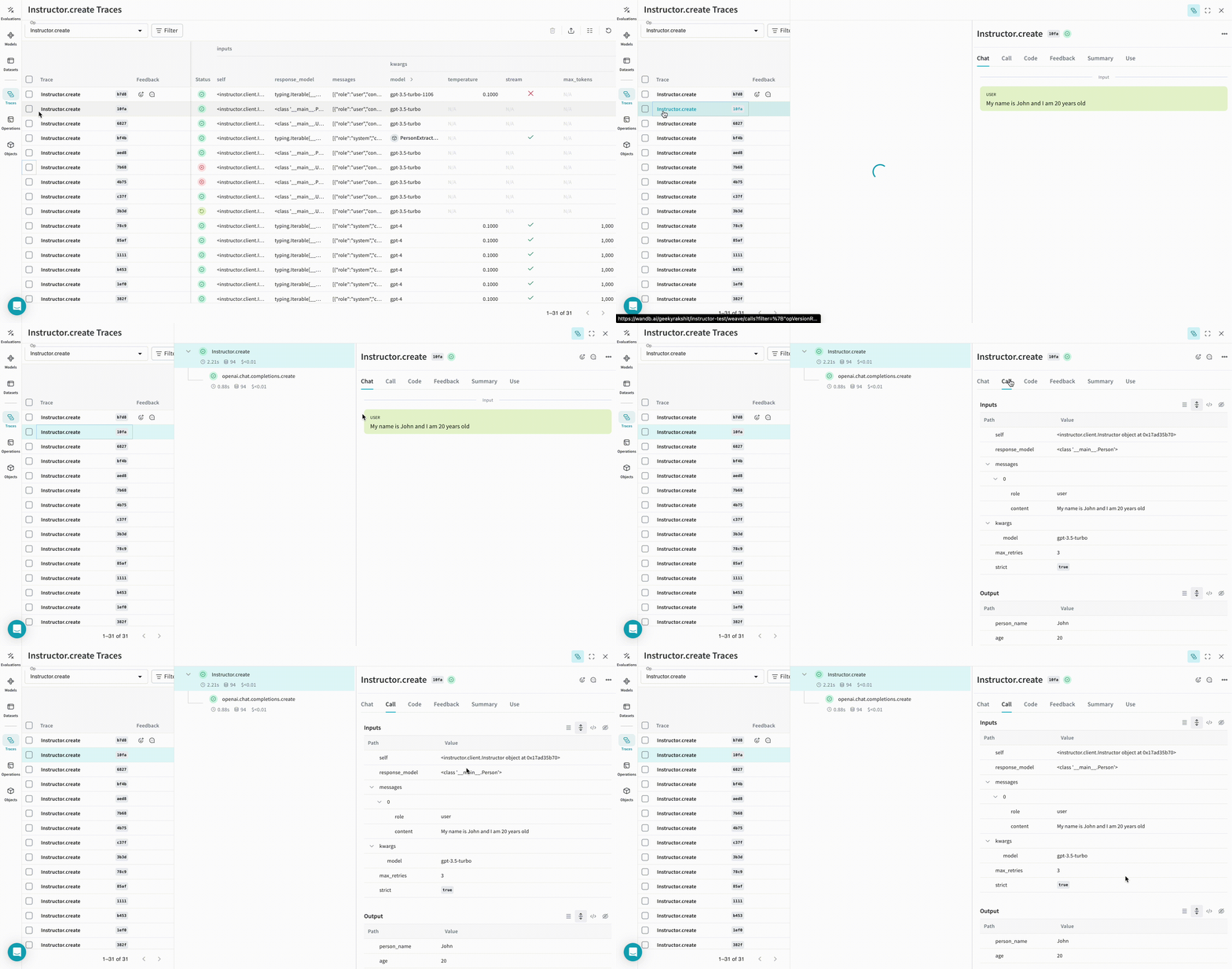
| 이제 Weave가 Instructor를 사용해 이루어지는 모든 LLM calls을 추적하고 로깅합니다. Weave 웹 인터페이스에서 해당 트레이스를 확인할 수 있습니다. |
|
| ------------------------------------------------------------------------------------------------------------------------------------------------------------------------------------------------------------------------------------------------------------------------------------------------------------------------------------------------------------------------------------------------------------------------ |
| 이제 Weave가 Instructor를 사용해 이루어지는 모든 LLM calls을 추적하고 로깅합니다. Weave 웹 인터페이스에서 해당 트레이스를 확인할 수 있습니다. |
## 직접 만든 ops 추적하기
함수를 `@weave.op`로 감싸면 입력, 출력, 앱 로직 캡처가 시작되어 앱에서 데이터가 어떻게 흐르는지 디버그할 수 있습니다. ops를 깊게 중첩해 추적하려는 함수들의 트리를 구성할 수 있습니다. 또한 실험하는 동안 코드 버전 관리도 자동으로 시작되어 git에 커밋되지 않은 임시 세부 정보까지 캡처할 수 있습니다.
[`@weave.op`](/ko/weave/guides/tracking/ops)으로 데코레이트된 함수를 만들기만 하면 됩니다.
아래 예시에는 `extract_person` 함수가 있으며, 이 함수는 `@weave.op`로 감싼 metric 함수입니다. 이를 통해 OpenAI chat completion call과 같은 중간 step를 확인할 수 있습니다.
```python lines theme={null}
import instructor
import weave
from openai import OpenAI
from pydantic import BaseModel
# 원하는 출력 구조 정의
class Person(BaseModel):
person_name: str
age: int
# Weave 초기화
weave.init(project_name="instructor-test")
# OpenAI 클라이언트 패치
lm_client = instructor.from_openai(OpenAI())
# 자연어에서 구조화된 데이터 추출
@weave.op()
def extract_person(text: str) -> Person:
return lm_client.chat.completions.create(
model="gpt-3.5-turbo",
messages=[
{"role": "user", "content": text},
],
response_model=Person,
)
person = extract_person("My name is John and I am 20 years old")
```
|  |
| ----------------------------------------------------------------------------------------------------------------------------------------------------------------------------------------------------------------------------------------------------------------------------------------------------------------------------------------------------------------------------------------------------------------------------------------------------------------------------------------------------------------------------------------------------------------------------------------------------------------------------------------------------------------------------------------------------------------------------------------------------------------------------------------------------------------------------------------------------------------------------------------------------------------------------------------------------------------------------------------------------------------------------------------------------------------------------------------------------------------------------------------------------------------------------------------------------------------------------------------------------------------------------------------------------------------------------------------------------------------------------------------------------------------------------------------------------------------------------------------------------------------------------------------------------------------------------------------------------------------------------------------------------------------------------------------------------------------------------------------------------------------------------------------------------------------------------------------------------------- |
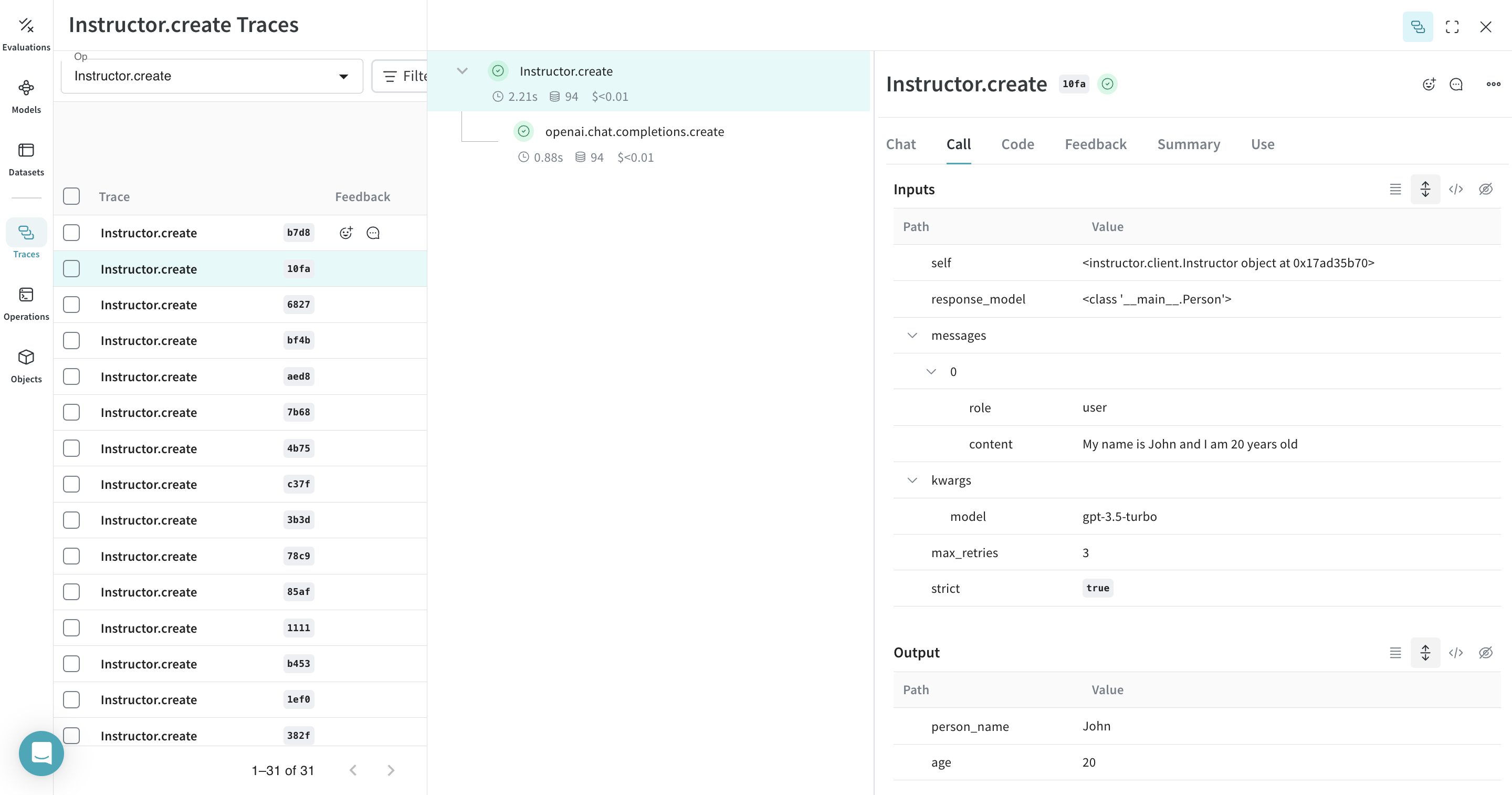
| `extract_person` 함수에 `@weave.op` 데코레이터를 적용하면 함수의 inputs, outputs와 함수 내부에서 발생하는 모든 LM calls이 트레이스됩니다. Weave는 또한 Instructor가 생성한 구조화된 객체를 자동으로 추적하고 버전 관리합니다. |
|
| ----------------------------------------------------------------------------------------------------------------------------------------------------------------------------------------------------------------------------------------------------------------------------------------------------------------------------------------------------------------------------------------------------------------------------------------------------------------------------------------------------------------------------------------------------------------------------------------------------------------------------------------------------------------------------------------------------------------------------------------------------------------------------------------------------------------------------------------------------------------------------------------------------------------------------------------------------------------------------------------------------------------------------------------------------------------------------------------------------------------------------------------------------------------------------------------------------------------------------------------------------------------------------------------------------------------------------------------------------------------------------------------------------------------------------------------------------------------------------------------------------------------------------------------------------------------------------------------------------------------------------------------------------------------------------------------------------------------------------------------------------------------------------------------------------------------------------------------------------------- |
| `extract_person` 함수에 `@weave.op` 데코레이터를 적용하면 함수의 inputs, outputs와 함수 내부에서 발생하는 모든 LM calls이 트레이스됩니다. Weave는 또한 Instructor가 생성한 구조화된 객체를 자동으로 추적하고 버전 관리합니다. |
## 더 쉽게 실험할 수 있도록 `Model` 만들기
구성 요소가 많아질수록 실험을 체계적으로 정리하기가 어렵습니다. [`Model`](../core-types/models) 클래스를 사용하면 시스템 프롬프트나 사용 중인 모델처럼 앱 실험의 세부 정보를 캡처하고 정리할 수 있습니다. 이렇게 하면 앱의 여러 버전을 정리하고 비교하는 데 도움이 됩니다.
코드를 버전 관리하고 입력/출력을 캡처하는 것에 더해, [`Model`](../core-types/models)은 애플리케이션의 동작을 제어하는 구조화된 파라미터도 캡처하므로 어떤 파라미터가 가장 잘 작동하는지 쉽게 파악할 수 있습니다. Weave Model은 `serve`(아래 참조) 및 [`Evaluation`](../core-types/evaluations)과 함께 사용할 수도 있습니다.
아래 예제에서는 `PersonExtractor`를 실험해 볼 수 있습니다. 이 항목 중 하나를 변경할 때마다 `PersonExtractor`의 새로운 *version*이 생성됩니다.
```python lines theme={null}
import asyncio
from typing import List, Iterable
import instructor
import weave
from openai import AsyncOpenAI
from pydantic import BaseModel
# 원하는 출력 구조 정의
class Person(BaseModel):
person_name: str
age: int
# Weave 초기화
weave.init(project_name="instructor-test")
# OpenAI 클라이언트 패치
lm_client = instructor.from_openai(AsyncOpenAI())
class PersonExtractor(weave.Model):
openai_model: str
max_retries: int
@weave.op()
async def predict(self, text: str) -> List[Person]:
model = await lm_client.chat.completions.create(
model=self.openai_model,
response_model=Iterable[Person],
max_retries=self.max_retries,
stream=True,
messages=[
{
"role": "system",
"content": "You are a perfect entity extraction system",
},
{
"role": "user",
"content": f"Extract `{text}`",
},
],
)
return [m async for m in model]
model = PersonExtractor(openai_model="gpt-4", max_retries=2)
asyncio.run(model.predict("John is 30 years old"))
```
|  |
| ------------------------------------------------------------------------------------------------------------------------------------------------------------------------------------------------------------------------------------------------------------------------------------------------------------------------------------------------------------------------------------------------------------------------------------------------------------------------------------------------------------------------------------------------------------------------------------------------------------------------------------------------------------------------------------------------------------------------------------------------------------------------------------------------------------------------------------------------------------------------------------------------------------------------------------------------------------------------------------------------------------------------------------------------------------------------------------------------------------------------------------------------------------------------------------------------------------------------------------------------------------------------------------------------------------------------------------------------------------------------------------------------------------------------------------------------------------------------------------------------------------------------------------------------------------------------------------------------------------------------------------------------------------------------------------------------------------------------------------------------------------------------------------------------------------------------------------------------------------------------- |
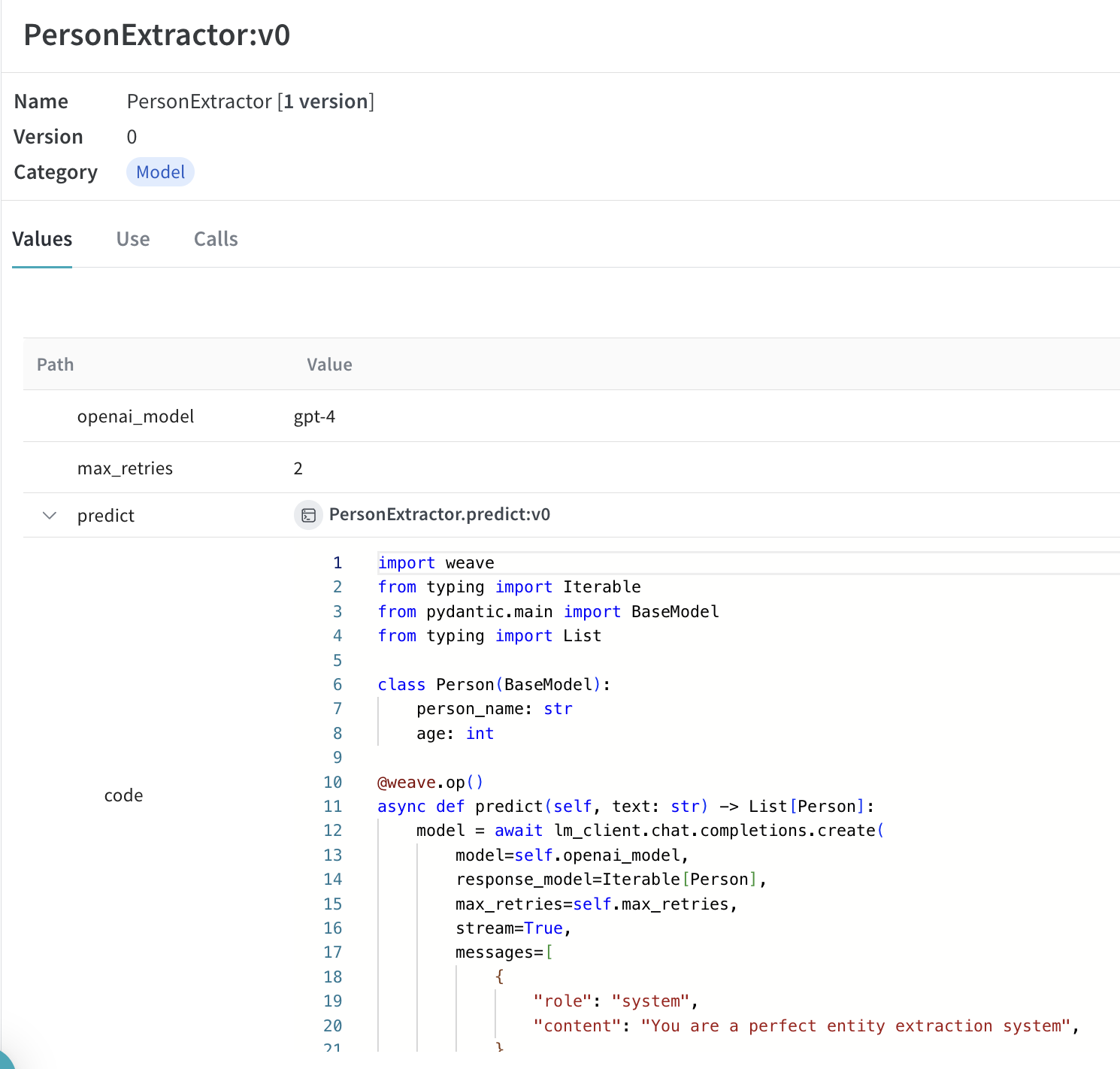
| [`Model`](../core-types/models)을 사용해 call을 트레이싱하고 버전 관리하기 |
|
| ------------------------------------------------------------------------------------------------------------------------------------------------------------------------------------------------------------------------------------------------------------------------------------------------------------------------------------------------------------------------------------------------------------------------------------------------------------------------------------------------------------------------------------------------------------------------------------------------------------------------------------------------------------------------------------------------------------------------------------------------------------------------------------------------------------------------------------------------------------------------------------------------------------------------------------------------------------------------------------------------------------------------------------------------------------------------------------------------------------------------------------------------------------------------------------------------------------------------------------------------------------------------------------------------------------------------------------------------------------------------------------------------------------------------------------------------------------------------------------------------------------------------------------------------------------------------------------------------------------------------------------------------------------------------------------------------------------------------------------------------------------------------------------------------------------------------------------------------------------------------- |
| [`Model`](../core-types/models)을 사용해 call을 트레이싱하고 버전 관리하기 |
## Weave Model 서빙
`weave.Model` 객체를 가리키는 weave 레퍼런스가 있으면 FastAPI 서버를 실행하고 [`serve`](https://docs.wandb.ai/weave/guides/tools/serve)할 수 있습니다.
| [ ](https://wandb.ai/geekyrakshit/instructor-test/weave/objects/PersonExtractor/versions/xXpMsJvaiTOjKafz1TnHC8wMgH5ZAAwYOaBMvHuLArI) |
| ------------------------------------------------------------------------------------------------------------------------------------------------------------------------------------------------------------------------------------------------------------------------------------------------------------------------------------------------------------------------------------------------------------------------------------------------------------------------------------------------------------------------------------------------------------------------------------------------------------------------------------------------------------------------------------------------------------------------------------------------------------------------------------------------------------------------------------------------------------------------------------------------------------------------------------------------------------------------------------------------------------------------------------------------------------------------------------------------------------------------------------------------------------------------------------------------------------------------------------------------------------------------------------------------------------------------------------------------------------------------------------------------------------------------------------------------------------------------------------------------------------------------------------------------------------------------------------------------------------------------------------------------------------------------------------------------------------------------------------------------------------------------------------------------------------------------------------------------------------------------------------------------------------------------------------------------- |
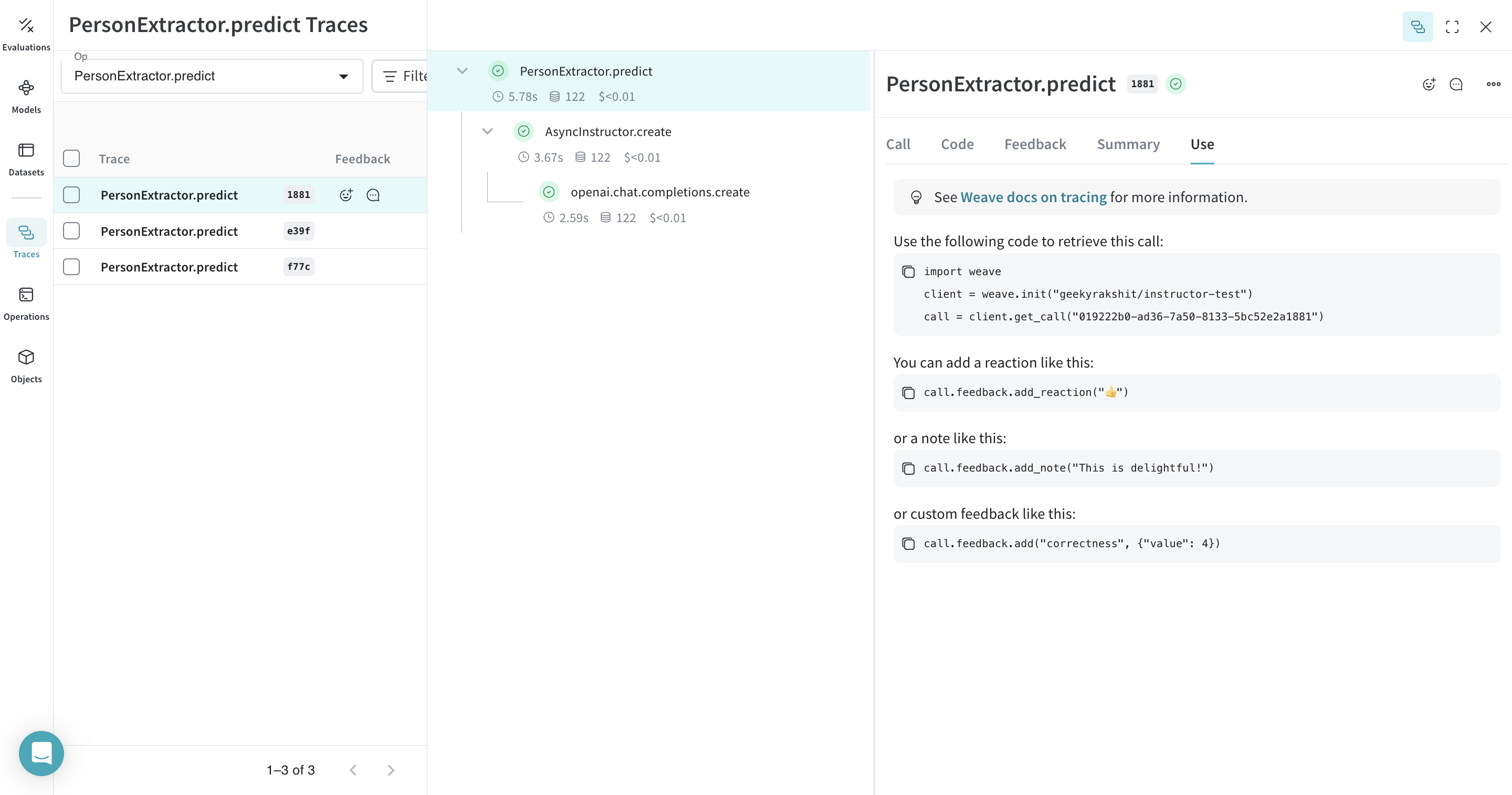
| 모델로 이동한 뒤 UI에서 복사하면 모든 `weave.Model`의 weave 레퍼런스를 찾을 수 있습니다. |
터미널에서 다음 명령어를 사용해 모델을 서빙할 수 있습니다:
```shell theme={null}
weave serve weave://your_entity/project-name/YourModel:
```
](https://wandb.ai/geekyrakshit/instructor-test/weave/objects/PersonExtractor/versions/xXpMsJvaiTOjKafz1TnHC8wMgH5ZAAwYOaBMvHuLArI) |
| ------------------------------------------------------------------------------------------------------------------------------------------------------------------------------------------------------------------------------------------------------------------------------------------------------------------------------------------------------------------------------------------------------------------------------------------------------------------------------------------------------------------------------------------------------------------------------------------------------------------------------------------------------------------------------------------------------------------------------------------------------------------------------------------------------------------------------------------------------------------------------------------------------------------------------------------------------------------------------------------------------------------------------------------------------------------------------------------------------------------------------------------------------------------------------------------------------------------------------------------------------------------------------------------------------------------------------------------------------------------------------------------------------------------------------------------------------------------------------------------------------------------------------------------------------------------------------------------------------------------------------------------------------------------------------------------------------------------------------------------------------------------------------------------------------------------------------------------------------------------------------------------------------------------------------------------------- |
| 모델로 이동한 뒤 UI에서 복사하면 모든 `weave.Model`의 weave 레퍼런스를 찾을 수 있습니다. |
터미널에서 다음 명령어를 사용해 모델을 서빙할 수 있습니다:
```shell theme={null}
weave serve weave://your_entity/project-name/YourModel:
```