> ## Documentation Index
> Fetch the complete documentation index at: https://wb-21fd5541-docs-1917.mintlify.site/llms.txt
> Use this file to discover all available pages before exploring further.

# DSPy

> Weave를 사용해 DSPy 모듈과 함수로 수행되는 call을 자동으로 추적하고 로깅합니다

export const GitHubLink = ({url}) => <a href={url} target="_blank" rel="noopener noreferrer" className="github-source-link">
    <svg width="20" height="20" viewBox="0 0 24 24" fill="currentColor" xmlns="http://www.w3.org/2000/svg">
      <path d="M12 0C5.37 0 0 5.37 0 12c0 5.31 3.435 9.795 8.205 11.385.6.105.825-.255.825-.57 0-.285-.015-1.23-.015-2.235-3.015.555-3.795-.735-4.035-1.41-.135-.345-.72-1.41-1.23-1.695-.42-.225-1.02-.78-.015-.795.945-.015 1.62.87 1.845 1.23 1.08 1.815 2.805 1.305 3.495.99.105-.78.42-1.305.765-1.605-2.67-.3-5.46-1.335-5.46-5.925 0-1.305.465-2.385 1.23-3.225-.12-.3-.54-1.53.12-3.18 0 0 1.005-.315 3.3 1.23.96-.27 1.98-.405 3-.405s2.04.135 3 .405c2.295-1.56 3.3-1.23 3.3-1.23.66 1.65.24 2.88.12 3.18.765.84 1.23 1.905 1.23 3.225 0 4.605-2.805 5.625-5.475 5.925.435.375.81 1.095.81 2.22 0 1.605-.015 2.895-.015 3.3 0 .315.225.69.825.57A12.02 12.02 0 0024 12c0-6.63-5.37-12-12-12z" />
    </svg>
    GitHub 소스 코드
  </a>;

export const ColabLink = ({url}) => <a href={url} target="_blank" rel="noopener noreferrer" className="colab-link">
    <svg width="20" height="20" viewBox="0 0 24 24" fill="currentColor" xmlns="http://www.w3.org/2000/svg">
      <path d="M14.25.18l.9.2.73.26.59.3.45.32.34.34.25.34.16.33.1.3.04.26.02.2-.01.13V8.5l-.05.63-.13.55-.21.46-.26.38-.3.31-.33.25-.35.19-.35.14-.33.1-.3.07-.26.04-.21.02H8.77l-.69.05-.59.14-.5.22-.41.27-.33.32-.27.35-.2.36-.15.37-.1.35-.07.32-.04.27-.02.21v3.06H3.17l-.21-.03-.28-.07-.32-.12-.35-.18-.36-.26-.36-.36-.35-.46-.32-.59-.28-.73-.21-.88-.14-1.05-.05-1.23.06-1.22.16-1.04.24-.87.32-.71.36-.57.4-.44.42-.33.42-.24.4-.16.36-.1.32-.05.24-.01h.16l.06.01h8.16v-.83H6.18l-.01-2.75-.02-.37.05-.34.11-.31.17-.28.25-.26.31-.23.38-.2.44-.18.51-.15.58-.12.64-.1.71-.06.77-.04.84-.02 1.27.05zm-6.3 1.98l-.23.33-.08.41.08.41.23.34.33.22.41.09.41-.09.33-.22.23-.34.08-.41-.08-.41-.23-.33-.33-.22-.41-.09-.41.09zm13.09 3.95l.28.06.32.12.35.18.36.27.36.35.35.47.32.59.28.73.21.88.14 1.04.05 1.23-.06 1.23-.16 1.04-.24.86-.32.71-.36.57-.4.45-.42.33-.42.24-.4.16-.36.09-.32.05-.24.02-.16-.01h-8.22v.82h5.84l.01 2.76.02.36-.05.34-.11.31-.17.29-.25.25-.31.24-.38.2-.44.17-.51.15-.58.13-.64.09-.71.07-.77.04-.84.01-1.27-.04-1.07-.14-.9-.2-.73-.25-.59-.3-.45-.33-.34-.34-.25-.34-.16-.33-.1-.3-.04-.25-.02-.2.01-.13v-5.34l.05-.64.13-.54.21-.46.26-.38.3-.32.33-.24.35-.2.35-.14.33-.1.3-.06.26-.04.21-.02.13-.01h5.84l.69-.05.59-.14.5-.21.41-.28.33-.32.27-.35.2-.36.15-.36.1-.35.07-.32.04-.28.02-.21V6.07h2.09l.14.01.21.03zm-6.47 14.25l-.23.33-.08.41.08.41.23.33.33.23.41.08.41-.08.33-.23.23-.33.08-.41-.08-.41-.23-.33-.33-.23-.41-.08-.41.08z" />
    </svg>
    Colab에서 사용해 보기
  </a>;

<div style={{ display: 'flex', gap: '12px', flexWrap: 'wrap' }}>
  <ColabLink url="https://colab.research.google.com/github/wandb/examples/blob/master/weave/docs/quickstart_dspy.ipynb" />

  <GitHubLink url="https://github.com/wandb/examples/blob/master/weave/docs/quickstart_dspy.ipynb" />
</div>

[DSPy](https://dspy.ai)는 특히 파이프라인 내에서 LM을 한 번 이상 사용할 때 LM 프롬프트와 가중치를 알고리즘적으로 최적화하는 프레임워크입니다. Weave는 DSPy 모듈과 함수를 사용해 발생한 call을 자동으로 추적하고 로깅합니다.

<div id="tracing">
  ## 트레이싱
</div>

개발 중이든 프로덕션 환경이든, 언어 모델 애플리케이션의 트레이스를 중앙에서 저장하는 것이 중요합니다. 이러한 트레이스는 디버깅에 유용하며, 애플리케이션 개선에 도움이 되는 데이터셋으로도 활용할 수 있습니다.

Weave는 [DSPy](https://dspy.ai)의 트레이스를 자동으로 수집합니다. 추적을 시작하려면 `weave.init(project_name="<YOUR-WANDB-PROJECT-NAME>")`를 호출한 다음, 평소처럼 라이브러리를 사용하세요.

```python lines theme={null}
import os
import dspy
import weave

os.environ["OPENAI_API_KEY"] = "<YOUR-OPENAI-API-KEY>"

weave.init(project_name="<YOUR-WANDB-PROJECT-NAME>")

lm = dspy.LM('openai/gpt-4o-mini')
dspy.configure(lm=lm)
classify = dspy.Predict("sentence -> sentiment")
classify(sentence="it's a charming and often affecting journey.")
```

[<img src="https://mintcdn.com/wb-21fd5541-docs-1917/zsRl3z0nMHzCkmWZ/weave/guides/integrations/imgs/dspy/dspy_trace.png?fit=max&auto=format&n=zsRl3z0nMHzCkmWZ&q=85&s=bf3e7bb1b5a260998879014ec6eda784" alt="dspy_trace.png" width="2880" height="1800" data-path="weave/guides/integrations/imgs/dspy/dspy_trace.png" />](https://wandb.ai/geekyrakshit/dspy-project/weave/calls)

Weave는 DSPy 프로그램의 모든 LM calls를 로깅하며, inputs, 출력, 메타데이터에 관한 세부 정보를 제공합니다.

<div id="track-your-own-dspy-modules-and-signatures">
  ## 사용자 정의 DSPy 모듈과 시그니처 추적하기
</div>

`Module`은 프롬프팅 기법을 추상화하는, 학습 가능한 매개변수를 갖춘 DSPy 프로그램의 기본 구성 요소입니다. `시그니처`는 DSPy Module의 입력/출력 동작을 선언적으로 정의하는 사양입니다. Weave는 DSPy 프로그램의 모든 내장 및 사용자 정의 시그니처와 모듈을 자동으로 추적합니다.

```python lines theme={null}
import os
import dspy
import weave

os.environ["OPENAI_API_KEY"] = "<YOUR-OPENAI-API-KEY>"

weave.init(project_name="<YOUR-WANDB-PROJECT-NAME>")

class Outline(dspy.Signature):
    """Outline a thorough overview of a topic."""

    topic: str = dspy.InputField()
    title: str = dspy.OutputField()
    sections: list[str] = dspy.OutputField()
    section_subheadings: dict[str, list[str]] = dspy.OutputField(
        desc="mapping from section headings to subheadings"
    )


class DraftSection(dspy.Signature):
    """Draft a top-level section of an article."""

    topic: str = dspy.InputField()
    section_heading: str = dspy.InputField()
    section_subheadings: list[str] = dspy.InputField()
    content: str = dspy.OutputField(desc="markdown-formatted section")


class DraftArticle(dspy.Module):
    def __init__(self):
        self.build_outline = dspy.ChainOfThought(Outline)
        self.draft_section = dspy.ChainOfThought(DraftSection)

    def forward(self, topic):
        outline = self.build_outline(topic=topic)
        sections = []
        for heading, subheadings in outline.section_subheadings.items():
            section, subheadings = (
                f"## {heading}",
                [f"### {subheading}" for subheading in subheadings],
            )
            section = self.draft_section(
                topic=outline.title,
                section_heading=section,
                section_subheadings=subheadings,
            )
            sections.append(section.content)
        return dspy.Prediction(title=outline.title, sections=sections)


draft_article = DraftArticle()
article = draft_article(topic="World Cup 2002")
```

[<img src="https://mintcdn.com/wb-21fd5541-docs-1917/zsRl3z0nMHzCkmWZ/weave/guides/integrations/imgs/dspy/dspy_custom_module.png?fit=max&auto=format&n=zsRl3z0nMHzCkmWZ&q=85&s=4e941fb789232a8c701bb41f83ae66a3" alt="모듈 실행 흐름과 트레이스 세부 정보를 보여주는 Weave의 DSPy 맞춤형 모듈 트레이스" width="3456" height="1864" data-path="weave/guides/integrations/imgs/dspy/dspy_custom_module.png" />](https://wandb.ai/geekyrakshit/dspy-project/weave/calls)

<div id="optimization-and-evaluation-of-your-dspy-program">
  ## DSPy 프로그램의 최적화 및 평가
</div>

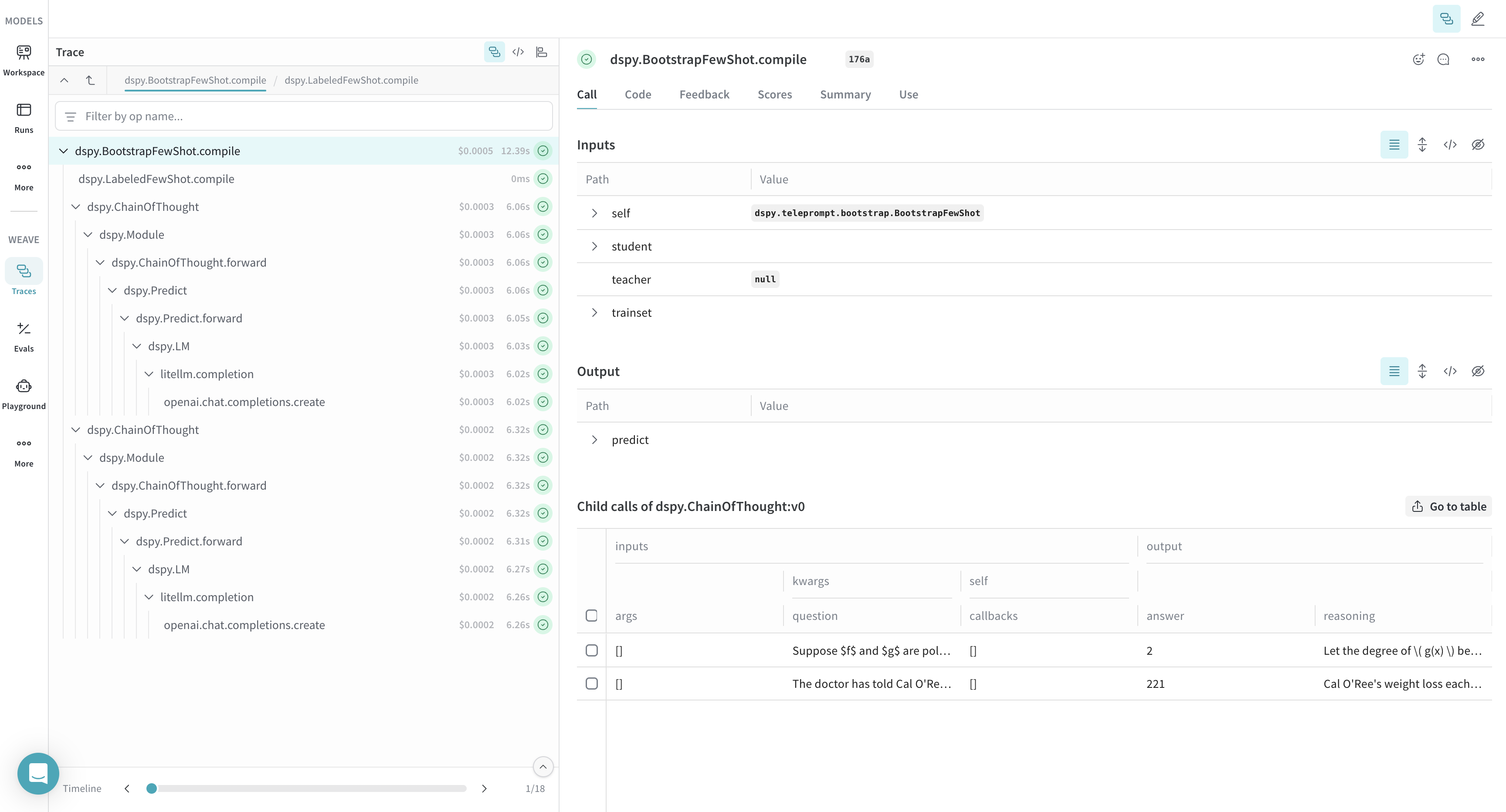
Weave는 DSPy 옵티마이저와 Evaluation call의 트레이스도 자동으로 수집하므로, 이를 활용해 개발 세트에서 DSPy 프로그램의 성능을 개선하고 평가할 수 있습니다.

```python lines theme={null}
import os
import dspy
import weave

os.environ["OPENAI_API_KEY"] = "<YOUR-OPENAI-API-KEY>"
weave.init(project_name="<YOUR-WANDB-PROJECT-NAME>")

def accuracy_metric(answer, output, trace=None):
    predicted_answer = output["answer"].lower()
    return answer["answer"].lower() == predicted_answer

module = dspy.ChainOfThought("question -> answer: str, explanation: str")
optimizer = dspy.BootstrapFewShot(metric=accuracy_metric)
optimized_module = optimizer.compile(
    module, trainset=SAMPLE_EVAL_DATASET, valset=SAMPLE_EVAL_DATASET
)
```

[<img src="https://mintcdn.com/wb-21fd5541-docs-1917/zsRl3z0nMHzCkmWZ/weave/guides/integrations/imgs/dspy/dspy_optimizer.png?fit=max&auto=format&n=zsRl3z0nMHzCkmWZ&q=85&s=5fe48025c48b0d16e9b1c2d089fc9a35" alt="최적화 과정과 성능 개선을 보여주는 Weave의 DSPy optimizer 트레이스" width="3456" height="1864" data-path="weave/guides/integrations/imgs/dspy/dspy_optimizer.png" />](https://wandb.ai/geekyrakshit/dspy-project/weave/calls)